

Anchovy
Anchovy is a cross-platform glossary editor that helps translators, localization teams, and technical writers create, maintain, and exchange terminology using open, standards-based formats.
Whether you're building a glossary from scratch, extracting terminology from documents or translated XLIFF files, or converting existing terminology resources between common industry formats, Anchovy provides a fast, lightweight workflow that integrates naturally into localization projects.
Anchovy combines glossary editing, terminology extraction, and format conversion in a single application. It supports the most common terminology formats used in the localization industry while keeping GlossML as its native, version-control-friendly storage format.
What you can do with Anchovy
- Create and edit glossaries. Build a glossary from scratch or open an existing one, add comment/term/definition columns per language, add or remove rows, and save in GlossML format.
- Search and replace. Find text across the open glossary, with case-sensitive and regular-expression matching, and replace one match or all of them.
- Change language codes. Change every term and definition column from one BCP 47 language code to another with a single command.
- Extract term candidates from a document. Analyze a monolingual document and generate a glossary of candidate terms, with control over minimum frequency and maximum term length, then review and prune the candidate list before saving.
- Extract bilingual term candidates from XLIFF. Read a translated XLIFF file and generate a bilingual glossary pairing source and target term candidates.
- Convert between formats. Import TMX, TBX, CSV, and Excel files into GlossML, and export glossaries to HTML, TMX, TBX, CSV, or Excel—all using Anchovy's built-in converters, with no external processors or stylesheets required.
Source Code Access

Anchovy source code is available on GitHub and can be downloaded, compiled, modified, and used free of charge.
We offer subscriptions that include installers, technical support, bug fixes, and feature requests. Subscription fees support ongoing development and help maintain the quality and reliability of Anchovy.
The version of Anchovy included in the official installers can be used with a free 7-day trial by requesting an evaluation key. After the trial period expires, a subscription is required.
Subscription keys are available from our Online Store and cannot be shared or transferred between machines.
The subscription version includes direct email support at tech@maxprograms.com

Localization Suite
Maxprograms Localization Suite bundles Anchovy, Swordfish, TMXEditor and Stingray and saves you more than a quarter off the combined price of the four apps.
Subscription Benefits
| Source Code | Subscription Based | |
|---|---|---|
| Ready To Use Installers | No | Yes |
| Notarized macOS launcher | No | Yes |
| Signed launcher and installer for Windows | No | Yes |
| Technical Support |
|
|
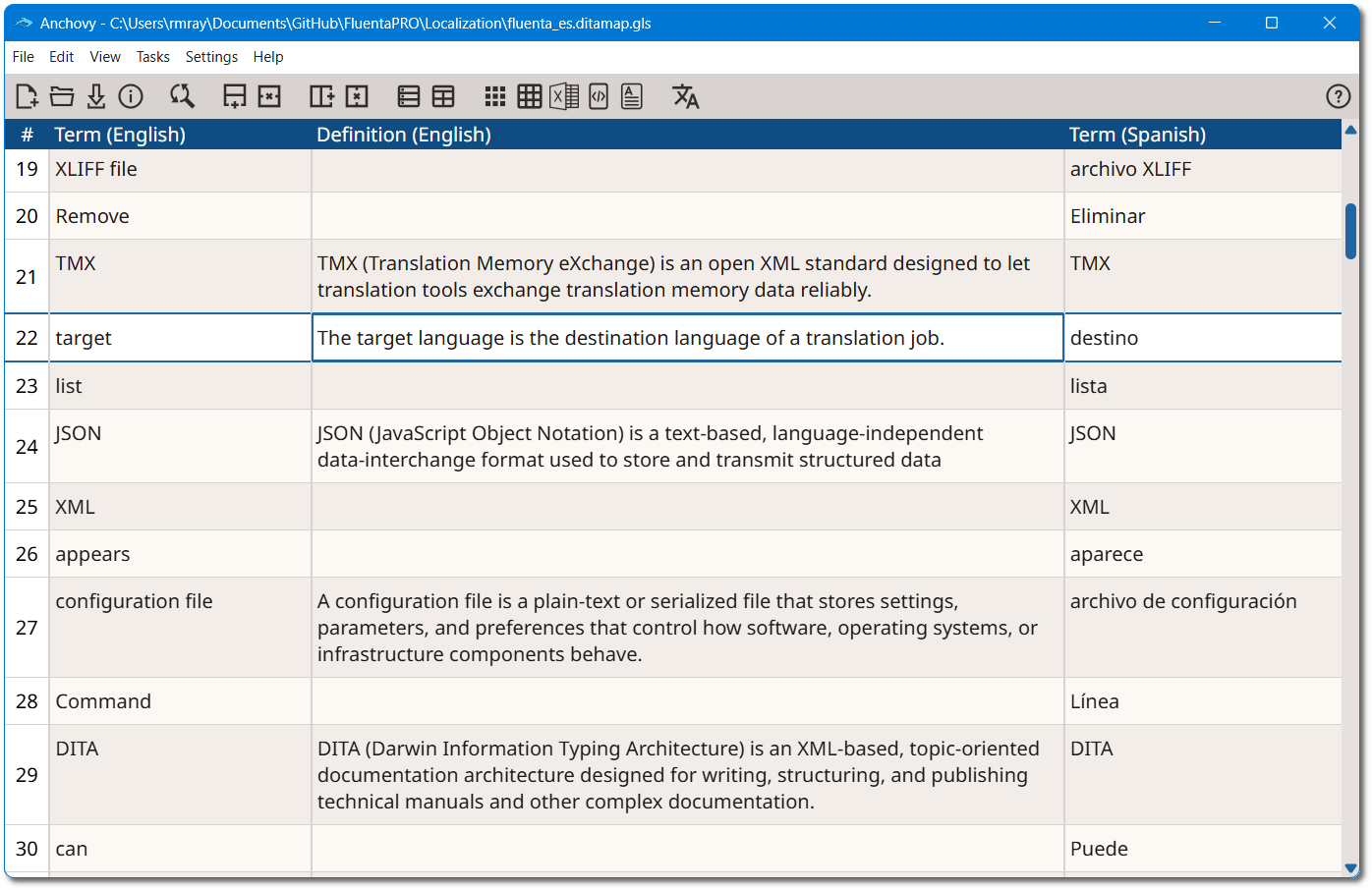
Anchovy GUI
Supported Formats
Glossary and terminology formats
- GlossML — Anchovy's native format: a compact XML vocabulary (6 elements, 4 attributes) for storing glossary data. Not intended for full terminology exchange, but simple enough to be trivial to generate, parse and version.
- CSV — with configurable character set, column separator and text delimiter, and a column-by-column preview for mapping columns to Skip/Comment/Term/Definition roles.
- Excel (.xlsx) — same column-mapping workflow as CSV, with worksheet selection.
- TMX (Translation Memory eXchange) — import and export.
- TBX (TermBase eXchange, ISO 30042) — import and export.
- HTML — export only, for sharing or printing a glossary.
Document formats for monolingual term extraction
Anchovy's "Extract term candidates from a document" feature uses the same document filters as OpenXLIFF, so any format OpenXLIFF can convert to XLIFF can be analyzed for candidate terms, including:
- Microsoft Office (2007 and newer), OpenOffice/LibreOffice/StarOffice, Plain Text, Markdown (CommonMark, GitHub Flavored Markdown, Pandoc, and other dialects), HTML
- Adobe InCopy ICML, Adobe InDesign Interchange (INX) and IDML (CS4–CC), MIF (Maker Interchange Format), Visio XML Drawings
- XML-based formats: generic XML, DITA (1.0–1.3), DocBook (3.x–5.x), SVG, XHTML, Word 2003 ML
- Subtitles: SRT, VTT (WebVTT)
- Software development formats: JavaScript, JSON, Java Properties, PHP Arrays, PO, RC (Windows C/C++ Resources), ResX (Windows .NET Resources), TS (Qt Linguist)